> ## Documentation Index
> Fetch the complete documentation index at: https://docs.cosmos.network/llms.txt
> Use this file to discover all available pages before exploring further.
# Transaction Tracking
> This document covers the tooling provided in Skip Go for tracking transaction status across multiple chains and bridge hops.
## Background
The `/v2/tx` endpoints include unified APIs that broadcast transactions and provide insight into the status of transactions and their subsequent cross-chain actions.
You can use the `/v2/tx` endpoints to track the progress of a cross-chain transfer or swap in realtime -- no matter how many chains or bridges the transfer touches. (For more advanced use cases, the endpoints support tracking multiple distinct transfers initiated in a single transaction).
You can also use it to identify failure cases (e.g. a swap that fails due to slippage, an IBC transfer that fails due to inactive relayers) and determine where the user's tokens will become available.
For example, if one of your end users initiates a swap that begins with ATOM on Neutron and concludes with ATOM on Osmosis, you can use the lifecycle tracking to report when the ATOM moves from Neutron to Osmosis.
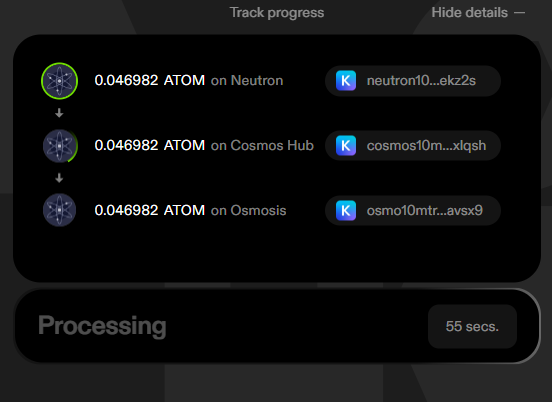 ## Basics
At a high-level, the transaction tracking works in two stages:
1. Inform our tracking engine that you want to track a particular transaction by submitting it to the chain via `/v2/tx/submit` or submitting it to your own Node RPC then calling `/v2/tx/track`
2. Query the transaction status at some regular interval to get updates on it's progress
**Tracking Multiple Independent Routes**
You can use the endpoint to track multiple transfers initiated in a single transaction, where the status of transfer `i` is given by entry `i` in the `transfers` array. For example, I could transfer ATOM to the Cosmos Hub and OSMO to Osmosis in a single transaction and track them with `transfers[0]` and `transfers[1]` respectively.
For a single transfer that has multiple hops (e.g. transferring ATOM to the Cosmos Hub then to Osmosis), you can track the status of each hop using the entries of `transfers[i].transfer_sequence`
The status endpoint provides a mixture of high-level fields to keep track of the basic progress of your route and low-level fields to provide high visbility into the individual transactions that make up a single transfer.
### Important high-level `/v2/tx/status` fields
Each entry in the `transfers` array corresponds to a single route that may contain many steps, and each entry in `transfer_sequence` will contain very detailed information about each step in that route.
But there a few high-level fields in each `transfers` entry that you'll find useful no matter what your route does or what bridges it involves:
* `state`: The basic status of your route. **This lets you report the basic state of the route to the user (e.g. in progress, failed, etc...)**
* `STATE_SUBMITTED`: Indicates the transaction has been accepted for tracking but no on chain evidence has been found yet.
* `STATE_ABANDONED`: Tracking has stopped after 30 minutes without progress. There is likely a relayer outage, an undetected out of gas error, or some other problem.
* `STATE_PENDING`: The route is in progress and no errors have occurred yet
* `STATE_PENDING_ERROR`: The route is in progress and an error has occurred somewhere, but the error is currently propagating, so the user doesn't have their tokens returned yet. (This state will only occur for protocols that require an *acknowledgement* on the source chain to process an error. IBC only at this time)
* `STATE_COMPLETED_SUCCESS`: The route has completed successfully and the user has their tokens on the destination (indicated by `transfer_asset_release`)
* `STATE_COMPLETED_ERROR`: The route errored somewhere and the user has their tokens unlocked in one of their wallets. Their tokens are either on the source chain, an intermediate chain, or the destination chain but in the wrong asset. ( `transfer_asset_release` indicates where the tokens are)
* `next_blocking_transfer`: Gives the index of the entry in `transfer_sequence` that corresponds to the currently propagating transfer that is immediately blocking the release of the user's tokens -- `next_blocking_transfer.transfer_sequence_index` (it could be propagating forward or it could be propagating an error ack backward). **This lets you tell the user exactly which operation is pending at a given time**
* `transfer_asset_release`: Info about where the users tokens will be released when the route completes. This populates on `STATE_PENDING_ERROR`, `STATE_COMPLETED_SUCCESS`, or `STATE_COMPLETED_ERROR`. **This lets you tell the user where to recover their funds in the event of a success or failure** *(If you want to better understand how to predict this or where funds might end up, see [Cross-chain Failure Cases](../advanced-transfer/handling-cross-chain-failure-cases))*
* `transfer_asset_release.released`: Boolean given whether the funds are currently available (if the state is`STATE_PENDING_ERROR` , this will be `false`)
* `transfer_asset_release.chain_id`: Chain where the assets are released or will be released
* `transfer_asset_release.denom`: Denom of the tokens the user will have
### Detailed Info: Using`transfer_sequence`
The `transfer_sequence` array consists of `TransferEvent` objects, which give detailed information about an individual transfer operation. The object acts as a wrapper around one details object for each bridge we support:
* `CCTPTransferInfo`
* `IBCTransferInfo`
* `AxelarTransferInfo`
* `HyperlaneTransferInfo`
* `GoFastTransferInfo`
* `StargateTransferInfo`
Each one contains slightly different data and statuses corresponding to the details of their bridge, but they all contain some standard info:
* `from_chain_id`
* `to_chain_id`
* Transactions and block explorer links for all of the significant events in the transfer (send tx, receive tx, and sometimes acknowledge tx)
* A status field giving the status of the transfer, which can vary based on bridge
#### IBC Transfer Data
The `state` field in the `IBCTransferInfo` entries in the `transfer_sequence` array have the following meanings:
* `TRANSFER_UNKNOWN`: The transfer state is unknown
* `TRANSFER_PENDING` - The send packet for the transfer has been committed and the transfer is pending
* `TRANSFER_PENDING_ERROR` - There has been a problem with the transfer (e.g. the packet has timed out) but the user doesn't have their funds unlocked yet because the error is still propagating
* `TRANSFER_RECEIVED`- The transfer packet has been received by the destination chain. It can still fail and revert if it is part of a multi-hop PFM transfer
* `TRANSFER_SUCCESS` - The transfer has been successfully completed and will not revert
* `TRANSFER_FAILURE` - The transfer
`packet_txs` contain transaction hashes, chain IDs, and block explorer links for up to 4 transactions:
* `send_tx`: The packet being sent from the source chain
* `receive_tx`: The packet being received on the destination chain
* `timeout_tx`: The packet being timed out on the destination chain
* `acknowledge_tx`: The successful or failed acknowledgement of the packet on the source chain
#### Axelar Transfer Data
When one of the transfers is an Axelar transfer, the `transfer_sequence` array will give an `axelar_transfer` (`AxelarTransferInfo`), instead of an `ibc_transfer`, which contains different data because:
* The Skip Go API may utilize send\_token or contract\_call\_with\_token (two underlying Axelar protocols) depending on which is cheaper and which is required to execute the user's intent
* Axelar does not have a notion of packets or acks, like IBC does
* Axelar provides a nice high level UI (Axelarscan) to track the status of their transfers
More precise details about all the fields are below:
* `type` : an enum of `AXELAR_TRANSFER_SEND_TOKEN` and `AXELAR_TRANSFER_CONTRACT_CALL_WITH_TOKEN` which indicate whether the Axelar transfer is a [Send Token](https://docs.axelar.dev/dev/send-tokens/overview) or a [Contract Call With Token](https://docs.axelar.dev/dev/general-message-passing/gmp-tokens-with-messages) transfer respectively.
* `axelar_scan_link`: Gives the link to Axelar's bridge explorer (which can help track down and unstick transactions)
* `state` field indicates the current state of the Axelar transfer using the following values:
* `AXELAR_TRANSFER_UNKNOWN` - The transfer state is unknown
* `AXELAR_TRANSFER_PENDING_CONFIRMATION` - The transfer has been initiated but is pending confirmation by the Axelar network
* `AXELAR_TRANSFER_PENDING_RECEIPT` - The transfer has been confirmed by the Axelar network and is pending receipt at the destination
* `AXELAR_TRANSFER_SUCCESS` - The transfer has been completed successfully and assets have been received at the destination
* `AXELAR_TRANSFER_FAILURE` - The transfer has failed
* `txs` field schema depends on the `type` of the transfer
* If `type` is `AXELAR_TRANSFER_SEND_TOKEN`, there are 3 txs:
* `send_tx` (initiating the transfer)
* `confirm_tx`(confirming the transfer on axelar)
* `execute_tx` (executing the transfer on the destination)
* If `type` is `AXELAR_TRANSFER_CONTRACT_CALL_WITH_TOKEN`:
* `send_tx` (initiating the transfer)
* `gas_paid_tx` (paying for the relayer gas on the source chain)
* `approve_tx` (approving the transaction on Axelar - only exists when the destination chain is an EVM chain)
* `confirm_tx`(confirming the transfer on Axelar - only exists when destination chain is a Cosmos chain)
* `execute_tx` (executing the transfer on the destination)
#### CCTP Transfer Data
When one of the transfers is a CCTP transfer, the `transfer_sequence` array will give a `cctp_transfer` (`CCTPTransferInfo`), instead of an `ibc_transfer`, which contains different data because:
* CCTP works by Circle attesting to & signing off on transfers
* There's no notion of an acknowledgement in CCTP
More precise details about the different/new fields are below:
* `state` gives the status of the CCTP transfer:
* `CCTP_TRANSFER_UNKNOWN` - Unknown error
* `CCTP_TRANSFER_SENT` - The burn transaction on the source chain has executed
* `CCTP_TRANSFER_PENDING_CONFIRMATION` - CCTP transfer is pending confirmation by the cctp attestation api
* `CCTP_TRANSFER_CONFIRMED` - CCTP transfer has been confirmed by the cctp attestation api but not yet received on the destination chain
* `CCTP_TRANSFER_RECEIVED` - CCTP transfer has been received at the destination chain
* `txs` contains the chain IDs, block explorer links, and hashes for two transactions:
* `send_tx`: The transaction submitted the CCTP burn action on the source chain to initiate the transfer
* `receive_tx`: The transaction on the destination chain where the user receives their funds
**Note:** CCTP transfers have a maximum limit of 1,000,000 USDC per transaction.
#### Hyperlane Transfer Data
When one of the transfers is a Hyperlane transfer, the `transfer_sequence` array will give a `hyperlane_transfer` (`HyperlaneTransferInfo`), instead of an `ibc_transfer`, which contains different data because:
* Hyperlane is a very flexible protocol where the notion of "approving/verifying" the transfer is undefined / up to the bridge developer to implement
* There's no notion of an acknowledgement in Hyperlane
More precise details about the different/new fields are below:
* `state` gives the status of the Hyperlane transfer:
* `HYPERLANE_TRANSFER_UNKNOWN` - Unknown error
* `HYPERLANE_TRANSFER_SENT` - The Hyperlane transfer transaction on the source chain has executed
* `HYPERLANE_TRANSFER_FAILED` - The Hyperlane transfer failed
* `HYPERLANE_TRANSFER_RECEIVED` - The Hyperlane transfer has been received at the destination chain
* `txs` contains the chain IDs, block explorer links, and hashes for two transactions:
* `send_tx`: The transaction submitted the CCTP burn action on the source chain to initiate the transfer
* `receive_tx`: The transaction on the destination chain where the user receives their funds
### OPInit Transfer Data
When one of the transfers is a OPInit transfer, the `transfer_sequence` array will give a `op_init_transfer` (`OPInitTransferInfo`), instead of an `ibc_transfer`, which contains different data because:
* The OPInit bridge is the Initia ecosystem's native bridging solution facilitating transfers between Initia and the Minitias.
* There's no notion of an acknowledgement in the OPInit bridge
More precise details about the different/new fields are below:
* `state` gives the status of the OPInit transfer:
* `OPINIT_TRANSFER_UNKNOWN` - Unknown error
* `OPINIT_TRANSFER_SENT` - The deposit transaction on the source chain has executed
* `OPINIT_TRANSFER_RECEIVED` - OPInit transfer has been received at the destination chain
* `txs` contains the chain IDs, block explorer links, and hashes for two transactions:
* `send_tx`: The transaction that submitted the OPInit deposit action on the source chain to initiate the transfer
* `receive_tx`: The transaction on the destination chain where the user receives their funds
### Go Fast Transfer Data
When one of the transfers is a `GoFastTransfer`, the `transfer_sequence` array will include a `go_fast_transfer` (`GoFastTransferInfo`). This field includes specific information about user-initiated intents and solver fulfillments, which require specific data fields to track the transfer process.
Below are detailed explanations of the different fields and their purposes:
* `from_chain_id`: The chain ID where the transfer originates (source chain).
* `to_chain_id`: The chain ID where the assets are being sent (destination chain).
* `state`: Indicates the current status of the transfer. Possible values are:
* `GO_FAST_TRANSFER_UNKNOWN`: An unknown error has occurred.
* `GO_FAST_TRANSFER_SENT`: The user's intent has been successfully submitted on the source chain.
* `GO_FAST_POST_ACTION_FAILED`: The transfer's post-intent action failed. For example a swap on the destination chain failed due to slippage.
* `GO_FAST_TRANSFER_TIMEOUT`: The transfer did not complete within the expected time frame.
* `GO_FAST_TRANSFER_FILLED`: The transfer was successfully fulfilled on the destination chain.
* `GO_FAST_TRANSFER_REFUNDED`: The user's assets have been refunded on the source chain.
* `txs`: Contains transaction details related to the GoFast transfer:
* `order_submitted_tx`: The transaction where the user called initiateIntent on the source chain.
* `order_filled_tx`: The transaction where the solver called fulfill on the destination chain.
* `order_refunded_tx`: The transaction where the user received a refund on the source chain, if applicable.
* `order_timeout_tx`: The transaction indicating a timeout occurred in the transfer process.
* `error_message`: A message describing the error that occurred during the transfer, if applicable.
When tracking a Go Fast transfer, you can use the `GoFastTransferInfo` to monitor the progress and status of your asset transfer between chains. For instance, if the state is `GO_FAST_TRANSFER_FILLED`, you know that the transfer was successful and your assets should be available on the destination chain. If the state is `GO_FAST_TRANSFER_TIMEOUT`, you can check the `orderTimeoutTx` for details on the timeout event.
### Stargate Transfer Data
When one of the transfers is a `StargateTransfer`, the `transfer_sequence` array will include a `stargate_transfer` (`StargateTransferInfo`). This provides detailed information about a cross-chain asset transfer powered by Stargate, a popular cross-chain bridging protocol.
Below are detailed explanations of the fields and their purposes:
* `from_chain_id`: The chain ID where the transfer originates (source chain).
* `to_chain_id`: The chain ID where the assets are being sent (destination chain).
* `state`: Indicates the current status of the Stargate transfer. Possible values are:
* `STARGATE_TRANSFER_UNKNOWN`: An unknown error has occurred or the state cannot be determined.
* `STARGATE_TRANSFER_SENT`: The transfer has been successfully initiated on the source chain (i.e., the assets have left the source chain and are in transit).
* `STARGATE_TRANSFER_RECEIVED`: The transfer has been successfully completed on the destination chain (i.e., the assets are now available at the recipient address on the destination chain).
* `STARGATE_TRANSFER_FAILED`: The transfer encountered an error during bridging and did not complete as intended.
* `txs`: Contains transaction details related to the Stargate transfer.
* `send_tx`: The transaction on the source chain that initiated the Stargate transfer.
* `receive_tx`: The transaction on the destination chain where the assets were received.
* `error_tx`: A transaction (if any) related to the failure of the transfer.
When monitoring a Stargate transfer, you can use `StargateTransferInfo` to confirm that your assets have safely bridged between chains or identify if and where a problem has occurred.
The Go Fast Protocol involves interactions with solvers who fulfill transfer intents. The additional transaction fields help provide transparency and traceability throughout the transfer process, ensuring users can track each step and identify any issues that may arise.
## Detailed Example of Typical Usage
This will walk through an example of how a developer would use the api to track the progress of a route that may include multiple
In this particular example, we'll cover a simple 2-hop IBC transfer from axelar to the cosmoshub through osmosis.
*Usage is similar for tracking Axelar transfers or transfers that include multiple hops over distinct bridges but the data structures change slightly depending on what underlying bridge is being used*
### 1. Call `/tx/submit` to broadcast a transaction
Post a signed user transaction (that you can form using `/fungible` endpoints) to the `/submit` endpoint. The Skip Go API will handle the broadcasting of this transaction and asynchronously begin tracking the status of this transaction and any subsequent transfers.
A successful response looks like the following:
```JSON theme={"theme":{"light":"github-light-high-contrast","dark":"github-dark-high-contrast"}}
{
"tx_hash": "AAEA76709215A808AF6D7FC2B8FBB8746BC1F196E46FFAE84B79C6F6CD0A79C9"
}
```
It indicates that the transaction was accepted by the Skip Go API and its status can be tracked using the returned `tx_hash`.
The transaction is broadcast using `BROADCAST_MODE_SYNC` and in the event that a transaction is rejected by the node, the `/submit` endpoint will return a 400 response along with the failure reason as shown below:
```JSON theme={"theme":{"light":"github-light-high-contrast","dark":"github-dark-high-contrast"}}
{
"code": 3,
"message": "insufficient fees; got: 0uosmo which converts to 0uosmo. required: 2000uosmo: insufficient fee",
"details": []
}
```
**Tracking a transaction that was not broadcast using `/submit`**
If a transaction was not broadcast through the `/submit` endpoint and has already landed on chain, the `/track` endpoint can be used to initiate tracking of the transaction's progress.
### 2. Call `/status` to query the status of the transaction and IBC transfer progress
Skip Go API continually indexes chain state to determine the state of the transaction and the subsequent IBC transfer progress. This information can be queried using the `/status` endpoint.
It will initially yield a response that looks like the following:
* There's a top-level `transfers` field, which gives an array where each entry corresponds to a **single sequence of transfers**. This does not mean there's one entry in the `transfers` field for every bridging operation. In general, one `transfer` could consist of an arbitrarily long sequence of swaps and transfers over potentially multiple bridges. `transfers` is an array because one transaction can initiate potentially several distinct and independent transfers (e.g. transferring OSMO to Osmosis and ATOM to the Hub) in the same tx.
* The `state` field will give `STATE_SUBMITTED` indicating the transaction has been accepted for tracking by the Skip Go API but no events have been indexed yet:
```JSON theme={"theme":{"light":"github-light-high-contrast","dark":"github-dark-high-contrast"}}
{
"transfers": [
{
"state": "STATE_SUBMITTED",
"transfer_sequence": [],
"next_blocking_transfer": null,
"transfer_asset_release": null,
"error": null
}
]
}
```
Once indexing for the transaction has begun, the `state` will change to `STATE_PENDING`.
* The status of any transfers along the transfer sequence will be returned in the `transfer_sequence` field as shown in the example response below.
* The entries in the `transfer_sequence` correspond to transfers and will be represented by different objects depending on which bridge is being used (e.g. Axelar or IBC).
* The `next_blocking_transfer` field gives some information about the next blocking transfer in the`transfer_sequence` field.
* The `transfer_sequence_index` indicates which transfer in the `transfer_sequence` field is blocking progress.
* The `transfer_asset_release` field will be populated with information about the asset release as it is becomes known.
* The `chain_id` and `denom` fields indicate the location and asset being released.
* The `released` field indicates whether the assets are accessible. The `transfer_asset_release` field may become populated in advance of asset release if it can be determined with certainty where the eventual release will be. This will happen for example in a transfer sequence that is a PFM-enabled sequence of IBC transfers when one hop fails due to packet timeout or an acknowledgement failure. The transfer sequence will revert and the `transfer_asset_release` field will indicate that the assets will be released on the initial chain.
```JSON theme={"theme":{"light":"github-light-high-contrast","dark":"github-dark-high-contrast"}}
{
"transfers": [
{
"state": "STATE_PENDING",
"transfer_sequence": [
{
"ibc_transfer": {
"from_chain_id": "axelar_dojo-1",
"to_chain_id": "osmosis-1",
"state": "TRANSFER_PENDING",
"packet": {
"send_tx": {
"chain_id": "axelar-dojo-1",
"tx_hash": "AAEA76709215A808AF6D7FC2B8FBB8746BC1F196E46FFAE84B79C6F6CD0A79C9",
"explorer_link": "https://www.mintscan.io/axelar/transactions/AAEA76709215A808AF6D7FC2B8FBB8746BC1F196E46FFAE84B79C6F6CD0A79C9"
},
"receive_tx": null,
"acknowledge_tx": null,
"timeout_tx": null,
"error": null
}
}
}
],
"next_blocking_transfer": {
"transfer_sequence_index": 0
},
"transfer_asset_release": null,
"error": null
}
]
}
```
The transfer assets will be released before all expected acknowledgements have been indexed. When the transfer sequence has reached this state, the `status` will be updated to `STATE_RECEIVED` as shown in the example response below. Note that `transfer_asset_release` now indicates the chain ID of the chain where the assets are released and the denomination of the released assets.
```JSON theme={"theme":{"light":"github-light-high-contrast","dark":"github-dark-high-contrast"}}
{
"transfers": [
{
"state": "STATE_COMPLETED_SUCCESS",
"transfer_sequence": [
{
"ibc_transfer": {
"from_chain_id": "axelar_dojo-1",
"to_chain_id": "osmosis-1",
"state": "TRANSFER_PENDING",
"packet": {
"send_tx": {
"chain_id": "axelar-dojo-1",
"tx_hash": "AAEA76709215A808AF6D7FC2B8FBB8746BC1F196E46FFAE84B79C6F6CD0A79C9",
"explorer_link": "https://www.mintscan.io/axelar/transactions/AAEA76709215A808AF6D7FC2B8FBB8746BC1F196E46FFAE84B79C6F6CD0A79C9"
},
"receive_tx": {
"chain_id": "osmosis-1",
"tx_hash": "082A6C8024998EC277C2B90BFDDB323CCA506C24A6730C658B9B6DC653198E3D",
"explorer_link": "https://www.mintscan.io/osmosis/transactions/082A6C8024998EC277C2B90BFDDB323CCA506C24A6730C658B9B6DC653198E3D"
},
"acknowledge_tx": null,
"timeout_tx": null,
"error": null
}
}
},
{
"ibc_transfer": {
"from_chain_id": "osmosis-1",
"to_chain_id": "cosmoshub-4",
"state": "TRANSFER_SUCCESS",
"packet": {
"send_tx": {
"chain_id": "osmosis-1",
"tx_hash": "082A6C8024998EC277C2B90BFDDB323CCA506C24A6730C658B9B6DC653198E3D",
"explorer_link": "https://www.mintscan.io/osmosis/transactions/082A6C8024998EC277C2B90BFDDB323CCA506C24A6730C658B9B6DC653198E3D"
},
"receive_tx": {
"chain_id": "cosmoshub-4",
"tx_hash": "913E2542EBFEF2E885C19DD9C4F8ECB6ADAFFE59D60BB108FAD94FBABF9C5671",
"explorer_link": "https://www.mintscan.io/cosmos/transactions/913E2542EBFEF2E885C19DD9C4F8ECB6ADAFFE59D60BB108FAD94FBABF9C5671"
},
"acknowledge_tx": null,
"timeout_tx": null,
"error": null
}
}
}
],
"next_blocking_transfer": null,
"transfer_asset_release": {
"chain_id": "cosmoshub-4",
"denom": "uatom",
"released": true
},
"error": null
}
]
}
```
Once it has been determined that all packets along the transfer sequence have either been acknowledged or timed out, `state` will be updated to `STATE_COMPLETED_SUCCESS` as shown in the example response below. Note that `next_blocking_transfer` is now null since the transfer is complete.
```JSON theme={"theme":{"light":"github-light-high-contrast","dark":"github-dark-high-contrast"}}
{
"transfers": [
{
"state": "STATE_COMPLETED_SUCCESS",
"transfer_sequence": [
{
"ibc_transfer": {
"from_chain_id": "axelar_dojo-1",
"to_chain_id": "osmosis-1",
"state": "TRANSFER_SUCCESS",
"packet": {
"send_tx": {
"chain_id": "axelar-dojo-1",
"tx_hash": "AAEA76709215A808AF6D7FC2B8FBB8746BC1F196E46FFAE84B79C6F6CD0A79C9",
"explorer_link": "https://www.mintscan.io/axelar/transactions/AAEA76709215A808AF6D7FC2B8FBB8746BC1F196E46FFAE84B79C6F6CD0A79C9"
},
"receive_tx": {
"chain_id": "osmosis-1",
"tx_hash": "082A6C8024998EC277C2B90BFDDB323CCA506C24A6730C658B9B6DC653198E3D",
"explorer_link": "https://www.mintscan.io/osmosis/transactions/082A6C8024998EC277C2B90BFDDB323CCA506C24A6730C658B9B6DC653198E3D"
},
"acknowledge_tx": {
"chain_id": "axelar-dojo-1",
"tx_hash": "C9A36F94A5B2CA9C7ABF20402561E46FD8B80EBAC4F0D5B7C01F978E34285CCA",
"explorer_link": "https://www.mintscan.io/axelar/transactions/C9A36F94A5B2CA9C7ABF20402561E46FD8B80EBAC4F0D5B7C01F978E34285CCA"
},
"timeout_tx": null,
"error": null
}
}
},
{
"ibc_transfer": {
"from_chain_id": "osmosis-1",
"to_chain_id": "cosmoshub-4",
"state": "TRANSFER_SUCCESS",
"packet": {
"send_tx": {
"chain_id": "osmosis-1",
"tx_hash": "082A6C8024998EC277C2B90BFDDB323CCA506C24A6730C658B9B6DC653198E3D",
"explorer_link": "https://www.mintscan.io/osmosis/transactions/082A6C8024998EC277C2B90BFDDB323CCA506C24A6730C658B9B6DC653198E3D"
},
"receive_tx": {
"chain_id": "cosmoshub-4",
"tx_hash": "913E2542EBFEF2E885C19DD9C4F8ECB6ADAFFE59D60BB108FAD94FBABF9C5671",
"explorer_link": "https://www.mintscan.io/cosmos/transactions/913E2542EBFEF2E885C19DD9C4F8ECB6ADAFFE59D60BB108FAD94FBABF9C5671"
},
"acknowledge_tx": {
"chain_id": "osmosis-1",
"tx_hash": "1EDB2886E6FD59D6B9C096FBADB1A52585745694F4DFEE3A3CD3FF0153307EBC",
"explorer_link": "https://www.mintscan.io/osmosis/transactions/1EDB2886E6FD59D6B9C096FBADB1A52585745694F4DFEE3A3CD3FF0153307EBC"
},
"timeout_tx": null,
"error": null
}
}
}
],
"next_blocking_transfer": null,
"transfer_asset_release": {
"chain_id": "cosmoshub-4",
"denom": "uatom",
"released": true
},
"error": null
}
]
}
```
Any packet acknowledgement errors will be surfaced in the error field for the relevant packet as follows:
```JSON theme={"theme":{"light":"github-light-high-contrast","dark":"github-dark-high-contrast"}}
{
"transfers": [
{
"state": "STATE_COMPLETED_ERROR",
"transfer_sequence": [
{
"ibc_transfer": {
"from_chain_id": "osmosis-1",
"to_chain_id": "cosmoshub-4",
"state": "TRANSFER_FAILED",
"packet": {
"send_tx": {
"chain_id": "osmosis-1",
"tx_hash": "112714A8144019161CAAA8317016505A9A1DDF5DA7B146320A640814DDFA41C0",
"explorer_link": "https://www.mintscan.io/osmosis/transactions/112714A8144019161CAAA8317016505A9A1DDF5DA7B146320A640814DDFA41C0"
},
"receive_tx": {
"chain_id": "cosmoshub-4",
"tx_hash": "E7FB2152D8EA58D7F377D6E8DC4172C99791346214387B65676A723FCFC7C980",
"explorer_link": "https://www.mintscan.io/osmosis/cosmos/E7FB2152D8EA58D7F377D6E8DC4172C99791346214387B65676A723FCFC7C98"
},
"acknowledge_tx": {
"chain_id": "osmosis-1",
"tx_hash": "8C9C1FA55E73CD03F04813B51C697C1D98E326E1C71AB568A2D23BF8AEAFFEC7",
"explorer_link": "https://www.mintscan.io/osmosis/transactions/8C9C1FA55E73CD03F04813B51C697C1D98E326E1C71AB568A2D23BF8AEAFFEC7"
},
"timeout_tx": null,
"error": {
"code": 1,
"message": "ABCI code: 1: error handling packet: see events for details"
}
}
}
}
],
"next_blocking_transfer": null,
"transfer_asset_release": {
"chain_id": "osmosis-1",
"denom": "uosmo",
"released": true
},
"error": null
}
]
}
```
Any execution errors for the initial transaction will be surfaced in the error field at the top level of the response as follows:
```JSON theme={"theme":{"light":"github-light-high-contrast","dark":"github-dark-high-contrast"}}
{
"transfers": [
{
"state": "STATE_COMPLETED_ERROR",
"transfer_sequence": [],
"next_blocking_transfer": null,
"transfer_asset_release": null,
"error": {
"code": 11,
"message": "out of gas in location: Loading CosmWasm module: sudo; gasWanted: 200000, gasUsed: 259553: out of gas"
}
}
]
}
```
## Basics
At a high-level, the transaction tracking works in two stages:
1. Inform our tracking engine that you want to track a particular transaction by submitting it to the chain via `/v2/tx/submit` or submitting it to your own Node RPC then calling `/v2/tx/track`
2. Query the transaction status at some regular interval to get updates on it's progress
**Tracking Multiple Independent Routes**
You can use the endpoint to track multiple transfers initiated in a single transaction, where the status of transfer `i` is given by entry `i` in the `transfers` array. For example, I could transfer ATOM to the Cosmos Hub and OSMO to Osmosis in a single transaction and track them with `transfers[0]` and `transfers[1]` respectively.
For a single transfer that has multiple hops (e.g. transferring ATOM to the Cosmos Hub then to Osmosis), you can track the status of each hop using the entries of `transfers[i].transfer_sequence`
The status endpoint provides a mixture of high-level fields to keep track of the basic progress of your route and low-level fields to provide high visbility into the individual transactions that make up a single transfer.
### Important high-level `/v2/tx/status` fields
Each entry in the `transfers` array corresponds to a single route that may contain many steps, and each entry in `transfer_sequence` will contain very detailed information about each step in that route.
But there a few high-level fields in each `transfers` entry that you'll find useful no matter what your route does or what bridges it involves:
* `state`: The basic status of your route. **This lets you report the basic state of the route to the user (e.g. in progress, failed, etc...)**
* `STATE_SUBMITTED`: Indicates the transaction has been accepted for tracking but no on chain evidence has been found yet.
* `STATE_ABANDONED`: Tracking has stopped after 30 minutes without progress. There is likely a relayer outage, an undetected out of gas error, or some other problem.
* `STATE_PENDING`: The route is in progress and no errors have occurred yet
* `STATE_PENDING_ERROR`: The route is in progress and an error has occurred somewhere, but the error is currently propagating, so the user doesn't have their tokens returned yet. (This state will only occur for protocols that require an *acknowledgement* on the source chain to process an error. IBC only at this time)
* `STATE_COMPLETED_SUCCESS`: The route has completed successfully and the user has their tokens on the destination (indicated by `transfer_asset_release`)
* `STATE_COMPLETED_ERROR`: The route errored somewhere and the user has their tokens unlocked in one of their wallets. Their tokens are either on the source chain, an intermediate chain, or the destination chain but in the wrong asset. ( `transfer_asset_release` indicates where the tokens are)
* `next_blocking_transfer`: Gives the index of the entry in `transfer_sequence` that corresponds to the currently propagating transfer that is immediately blocking the release of the user's tokens -- `next_blocking_transfer.transfer_sequence_index` (it could be propagating forward or it could be propagating an error ack backward). **This lets you tell the user exactly which operation is pending at a given time**
* `transfer_asset_release`: Info about where the users tokens will be released when the route completes. This populates on `STATE_PENDING_ERROR`, `STATE_COMPLETED_SUCCESS`, or `STATE_COMPLETED_ERROR`. **This lets you tell the user where to recover their funds in the event of a success or failure** *(If you want to better understand how to predict this or where funds might end up, see [Cross-chain Failure Cases](../advanced-transfer/handling-cross-chain-failure-cases))*
* `transfer_asset_release.released`: Boolean given whether the funds are currently available (if the state is`STATE_PENDING_ERROR` , this will be `false`)
* `transfer_asset_release.chain_id`: Chain where the assets are released or will be released
* `transfer_asset_release.denom`: Denom of the tokens the user will have
### Detailed Info: Using`transfer_sequence`
The `transfer_sequence` array consists of `TransferEvent` objects, which give detailed information about an individual transfer operation. The object acts as a wrapper around one details object for each bridge we support:
* `CCTPTransferInfo`
* `IBCTransferInfo`
* `AxelarTransferInfo`
* `HyperlaneTransferInfo`
* `GoFastTransferInfo`
* `StargateTransferInfo`
Each one contains slightly different data and statuses corresponding to the details of their bridge, but they all contain some standard info:
* `from_chain_id`
* `to_chain_id`
* Transactions and block explorer links for all of the significant events in the transfer (send tx, receive tx, and sometimes acknowledge tx)
* A status field giving the status of the transfer, which can vary based on bridge
#### IBC Transfer Data
The `state` field in the `IBCTransferInfo` entries in the `transfer_sequence` array have the following meanings:
* `TRANSFER_UNKNOWN`: The transfer state is unknown
* `TRANSFER_PENDING` - The send packet for the transfer has been committed and the transfer is pending
* `TRANSFER_PENDING_ERROR` - There has been a problem with the transfer (e.g. the packet has timed out) but the user doesn't have their funds unlocked yet because the error is still propagating
* `TRANSFER_RECEIVED`- The transfer packet has been received by the destination chain. It can still fail and revert if it is part of a multi-hop PFM transfer
* `TRANSFER_SUCCESS` - The transfer has been successfully completed and will not revert
* `TRANSFER_FAILURE` - The transfer
`packet_txs` contain transaction hashes, chain IDs, and block explorer links for up to 4 transactions:
* `send_tx`: The packet being sent from the source chain
* `receive_tx`: The packet being received on the destination chain
* `timeout_tx`: The packet being timed out on the destination chain
* `acknowledge_tx`: The successful or failed acknowledgement of the packet on the source chain
#### Axelar Transfer Data
When one of the transfers is an Axelar transfer, the `transfer_sequence` array will give an `axelar_transfer` (`AxelarTransferInfo`), instead of an `ibc_transfer`, which contains different data because:
* The Skip Go API may utilize send\_token or contract\_call\_with\_token (two underlying Axelar protocols) depending on which is cheaper and which is required to execute the user's intent
* Axelar does not have a notion of packets or acks, like IBC does
* Axelar provides a nice high level UI (Axelarscan) to track the status of their transfers
More precise details about all the fields are below:
* `type` : an enum of `AXELAR_TRANSFER_SEND_TOKEN` and `AXELAR_TRANSFER_CONTRACT_CALL_WITH_TOKEN` which indicate whether the Axelar transfer is a [Send Token](https://docs.axelar.dev/dev/send-tokens/overview) or a [Contract Call With Token](https://docs.axelar.dev/dev/general-message-passing/gmp-tokens-with-messages) transfer respectively.
* `axelar_scan_link`: Gives the link to Axelar's bridge explorer (which can help track down and unstick transactions)
* `state` field indicates the current state of the Axelar transfer using the following values:
* `AXELAR_TRANSFER_UNKNOWN` - The transfer state is unknown
* `AXELAR_TRANSFER_PENDING_CONFIRMATION` - The transfer has been initiated but is pending confirmation by the Axelar network
* `AXELAR_TRANSFER_PENDING_RECEIPT` - The transfer has been confirmed by the Axelar network and is pending receipt at the destination
* `AXELAR_TRANSFER_SUCCESS` - The transfer has been completed successfully and assets have been received at the destination
* `AXELAR_TRANSFER_FAILURE` - The transfer has failed
* `txs` field schema depends on the `type` of the transfer
* If `type` is `AXELAR_TRANSFER_SEND_TOKEN`, there are 3 txs:
* `send_tx` (initiating the transfer)
* `confirm_tx`(confirming the transfer on axelar)
* `execute_tx` (executing the transfer on the destination)
* If `type` is `AXELAR_TRANSFER_CONTRACT_CALL_WITH_TOKEN`:
* `send_tx` (initiating the transfer)
* `gas_paid_tx` (paying for the relayer gas on the source chain)
* `approve_tx` (approving the transaction on Axelar - only exists when the destination chain is an EVM chain)
* `confirm_tx`(confirming the transfer on Axelar - only exists when destination chain is a Cosmos chain)
* `execute_tx` (executing the transfer on the destination)
#### CCTP Transfer Data
When one of the transfers is a CCTP transfer, the `transfer_sequence` array will give a `cctp_transfer` (`CCTPTransferInfo`), instead of an `ibc_transfer`, which contains different data because:
* CCTP works by Circle attesting to & signing off on transfers
* There's no notion of an acknowledgement in CCTP
More precise details about the different/new fields are below:
* `state` gives the status of the CCTP transfer:
* `CCTP_TRANSFER_UNKNOWN` - Unknown error
* `CCTP_TRANSFER_SENT` - The burn transaction on the source chain has executed
* `CCTP_TRANSFER_PENDING_CONFIRMATION` - CCTP transfer is pending confirmation by the cctp attestation api
* `CCTP_TRANSFER_CONFIRMED` - CCTP transfer has been confirmed by the cctp attestation api but not yet received on the destination chain
* `CCTP_TRANSFER_RECEIVED` - CCTP transfer has been received at the destination chain
* `txs` contains the chain IDs, block explorer links, and hashes for two transactions:
* `send_tx`: The transaction submitted the CCTP burn action on the source chain to initiate the transfer
* `receive_tx`: The transaction on the destination chain where the user receives their funds
**Note:** CCTP transfers have a maximum limit of 1,000,000 USDC per transaction.
#### Hyperlane Transfer Data
When one of the transfers is a Hyperlane transfer, the `transfer_sequence` array will give a `hyperlane_transfer` (`HyperlaneTransferInfo`), instead of an `ibc_transfer`, which contains different data because:
* Hyperlane is a very flexible protocol where the notion of "approving/verifying" the transfer is undefined / up to the bridge developer to implement
* There's no notion of an acknowledgement in Hyperlane
More precise details about the different/new fields are below:
* `state` gives the status of the Hyperlane transfer:
* `HYPERLANE_TRANSFER_UNKNOWN` - Unknown error
* `HYPERLANE_TRANSFER_SENT` - The Hyperlane transfer transaction on the source chain has executed
* `HYPERLANE_TRANSFER_FAILED` - The Hyperlane transfer failed
* `HYPERLANE_TRANSFER_RECEIVED` - The Hyperlane transfer has been received at the destination chain
* `txs` contains the chain IDs, block explorer links, and hashes for two transactions:
* `send_tx`: The transaction submitted the CCTP burn action on the source chain to initiate the transfer
* `receive_tx`: The transaction on the destination chain where the user receives their funds
### OPInit Transfer Data
When one of the transfers is a OPInit transfer, the `transfer_sequence` array will give a `op_init_transfer` (`OPInitTransferInfo`), instead of an `ibc_transfer`, which contains different data because:
* The OPInit bridge is the Initia ecosystem's native bridging solution facilitating transfers between Initia and the Minitias.
* There's no notion of an acknowledgement in the OPInit bridge
More precise details about the different/new fields are below:
* `state` gives the status of the OPInit transfer:
* `OPINIT_TRANSFER_UNKNOWN` - Unknown error
* `OPINIT_TRANSFER_SENT` - The deposit transaction on the source chain has executed
* `OPINIT_TRANSFER_RECEIVED` - OPInit transfer has been received at the destination chain
* `txs` contains the chain IDs, block explorer links, and hashes for two transactions:
* `send_tx`: The transaction that submitted the OPInit deposit action on the source chain to initiate the transfer
* `receive_tx`: The transaction on the destination chain where the user receives their funds
### Go Fast Transfer Data
When one of the transfers is a `GoFastTransfer`, the `transfer_sequence` array will include a `go_fast_transfer` (`GoFastTransferInfo`). This field includes specific information about user-initiated intents and solver fulfillments, which require specific data fields to track the transfer process.
Below are detailed explanations of the different fields and their purposes:
* `from_chain_id`: The chain ID where the transfer originates (source chain).
* `to_chain_id`: The chain ID where the assets are being sent (destination chain).
* `state`: Indicates the current status of the transfer. Possible values are:
* `GO_FAST_TRANSFER_UNKNOWN`: An unknown error has occurred.
* `GO_FAST_TRANSFER_SENT`: The user's intent has been successfully submitted on the source chain.
* `GO_FAST_POST_ACTION_FAILED`: The transfer's post-intent action failed. For example a swap on the destination chain failed due to slippage.
* `GO_FAST_TRANSFER_TIMEOUT`: The transfer did not complete within the expected time frame.
* `GO_FAST_TRANSFER_FILLED`: The transfer was successfully fulfilled on the destination chain.
* `GO_FAST_TRANSFER_REFUNDED`: The user's assets have been refunded on the source chain.
* `txs`: Contains transaction details related to the GoFast transfer:
* `order_submitted_tx`: The transaction where the user called initiateIntent on the source chain.
* `order_filled_tx`: The transaction where the solver called fulfill on the destination chain.
* `order_refunded_tx`: The transaction where the user received a refund on the source chain, if applicable.
* `order_timeout_tx`: The transaction indicating a timeout occurred in the transfer process.
* `error_message`: A message describing the error that occurred during the transfer, if applicable.
When tracking a Go Fast transfer, you can use the `GoFastTransferInfo` to monitor the progress and status of your asset transfer between chains. For instance, if the state is `GO_FAST_TRANSFER_FILLED`, you know that the transfer was successful and your assets should be available on the destination chain. If the state is `GO_FAST_TRANSFER_TIMEOUT`, you can check the `orderTimeoutTx` for details on the timeout event.
### Stargate Transfer Data
When one of the transfers is a `StargateTransfer`, the `transfer_sequence` array will include a `stargate_transfer` (`StargateTransferInfo`). This provides detailed information about a cross-chain asset transfer powered by Stargate, a popular cross-chain bridging protocol.
Below are detailed explanations of the fields and their purposes:
* `from_chain_id`: The chain ID where the transfer originates (source chain).
* `to_chain_id`: The chain ID where the assets are being sent (destination chain).
* `state`: Indicates the current status of the Stargate transfer. Possible values are:
* `STARGATE_TRANSFER_UNKNOWN`: An unknown error has occurred or the state cannot be determined.
* `STARGATE_TRANSFER_SENT`: The transfer has been successfully initiated on the source chain (i.e., the assets have left the source chain and are in transit).
* `STARGATE_TRANSFER_RECEIVED`: The transfer has been successfully completed on the destination chain (i.e., the assets are now available at the recipient address on the destination chain).
* `STARGATE_TRANSFER_FAILED`: The transfer encountered an error during bridging and did not complete as intended.
* `txs`: Contains transaction details related to the Stargate transfer.
* `send_tx`: The transaction on the source chain that initiated the Stargate transfer.
* `receive_tx`: The transaction on the destination chain where the assets were received.
* `error_tx`: A transaction (if any) related to the failure of the transfer.
When monitoring a Stargate transfer, you can use `StargateTransferInfo` to confirm that your assets have safely bridged between chains or identify if and where a problem has occurred.
The Go Fast Protocol involves interactions with solvers who fulfill transfer intents. The additional transaction fields help provide transparency and traceability throughout the transfer process, ensuring users can track each step and identify any issues that may arise.
## Detailed Example of Typical Usage
This will walk through an example of how a developer would use the api to track the progress of a route that may include multiple
In this particular example, we'll cover a simple 2-hop IBC transfer from axelar to the cosmoshub through osmosis.
*Usage is similar for tracking Axelar transfers or transfers that include multiple hops over distinct bridges but the data structures change slightly depending on what underlying bridge is being used*
### 1. Call `/tx/submit` to broadcast a transaction
Post a signed user transaction (that you can form using `/fungible` endpoints) to the `/submit` endpoint. The Skip Go API will handle the broadcasting of this transaction and asynchronously begin tracking the status of this transaction and any subsequent transfers.
A successful response looks like the following:
```JSON theme={"theme":{"light":"github-light-high-contrast","dark":"github-dark-high-contrast"}}
{
"tx_hash": "AAEA76709215A808AF6D7FC2B8FBB8746BC1F196E46FFAE84B79C6F6CD0A79C9"
}
```
It indicates that the transaction was accepted by the Skip Go API and its status can be tracked using the returned `tx_hash`.
The transaction is broadcast using `BROADCAST_MODE_SYNC` and in the event that a transaction is rejected by the node, the `/submit` endpoint will return a 400 response along with the failure reason as shown below:
```JSON theme={"theme":{"light":"github-light-high-contrast","dark":"github-dark-high-contrast"}}
{
"code": 3,
"message": "insufficient fees; got: 0uosmo which converts to 0uosmo. required: 2000uosmo: insufficient fee",
"details": []
}
```
**Tracking a transaction that was not broadcast using `/submit`**
If a transaction was not broadcast through the `/submit` endpoint and has already landed on chain, the `/track` endpoint can be used to initiate tracking of the transaction's progress.
### 2. Call `/status` to query the status of the transaction and IBC transfer progress
Skip Go API continually indexes chain state to determine the state of the transaction and the subsequent IBC transfer progress. This information can be queried using the `/status` endpoint.
It will initially yield a response that looks like the following:
* There's a top-level `transfers` field, which gives an array where each entry corresponds to a **single sequence of transfers**. This does not mean there's one entry in the `transfers` field for every bridging operation. In general, one `transfer` could consist of an arbitrarily long sequence of swaps and transfers over potentially multiple bridges. `transfers` is an array because one transaction can initiate potentially several distinct and independent transfers (e.g. transferring OSMO to Osmosis and ATOM to the Hub) in the same tx.
* The `state` field will give `STATE_SUBMITTED` indicating the transaction has been accepted for tracking by the Skip Go API but no events have been indexed yet:
```JSON theme={"theme":{"light":"github-light-high-contrast","dark":"github-dark-high-contrast"}}
{
"transfers": [
{
"state": "STATE_SUBMITTED",
"transfer_sequence": [],
"next_blocking_transfer": null,
"transfer_asset_release": null,
"error": null
}
]
}
```
Once indexing for the transaction has begun, the `state` will change to `STATE_PENDING`.
* The status of any transfers along the transfer sequence will be returned in the `transfer_sequence` field as shown in the example response below.
* The entries in the `transfer_sequence` correspond to transfers and will be represented by different objects depending on which bridge is being used (e.g. Axelar or IBC).
* The `next_blocking_transfer` field gives some information about the next blocking transfer in the`transfer_sequence` field.
* The `transfer_sequence_index` indicates which transfer in the `transfer_sequence` field is blocking progress.
* The `transfer_asset_release` field will be populated with information about the asset release as it is becomes known.
* The `chain_id` and `denom` fields indicate the location and asset being released.
* The `released` field indicates whether the assets are accessible. The `transfer_asset_release` field may become populated in advance of asset release if it can be determined with certainty where the eventual release will be. This will happen for example in a transfer sequence that is a PFM-enabled sequence of IBC transfers when one hop fails due to packet timeout or an acknowledgement failure. The transfer sequence will revert and the `transfer_asset_release` field will indicate that the assets will be released on the initial chain.
```JSON theme={"theme":{"light":"github-light-high-contrast","dark":"github-dark-high-contrast"}}
{
"transfers": [
{
"state": "STATE_PENDING",
"transfer_sequence": [
{
"ibc_transfer": {
"from_chain_id": "axelar_dojo-1",
"to_chain_id": "osmosis-1",
"state": "TRANSFER_PENDING",
"packet": {
"send_tx": {
"chain_id": "axelar-dojo-1",
"tx_hash": "AAEA76709215A808AF6D7FC2B8FBB8746BC1F196E46FFAE84B79C6F6CD0A79C9",
"explorer_link": "https://www.mintscan.io/axelar/transactions/AAEA76709215A808AF6D7FC2B8FBB8746BC1F196E46FFAE84B79C6F6CD0A79C9"
},
"receive_tx": null,
"acknowledge_tx": null,
"timeout_tx": null,
"error": null
}
}
}
],
"next_blocking_transfer": {
"transfer_sequence_index": 0
},
"transfer_asset_release": null,
"error": null
}
]
}
```
The transfer assets will be released before all expected acknowledgements have been indexed. When the transfer sequence has reached this state, the `status` will be updated to `STATE_RECEIVED` as shown in the example response below. Note that `transfer_asset_release` now indicates the chain ID of the chain where the assets are released and the denomination of the released assets.
```JSON theme={"theme":{"light":"github-light-high-contrast","dark":"github-dark-high-contrast"}}
{
"transfers": [
{
"state": "STATE_COMPLETED_SUCCESS",
"transfer_sequence": [
{
"ibc_transfer": {
"from_chain_id": "axelar_dojo-1",
"to_chain_id": "osmosis-1",
"state": "TRANSFER_PENDING",
"packet": {
"send_tx": {
"chain_id": "axelar-dojo-1",
"tx_hash": "AAEA76709215A808AF6D7FC2B8FBB8746BC1F196E46FFAE84B79C6F6CD0A79C9",
"explorer_link": "https://www.mintscan.io/axelar/transactions/AAEA76709215A808AF6D7FC2B8FBB8746BC1F196E46FFAE84B79C6F6CD0A79C9"
},
"receive_tx": {
"chain_id": "osmosis-1",
"tx_hash": "082A6C8024998EC277C2B90BFDDB323CCA506C24A6730C658B9B6DC653198E3D",
"explorer_link": "https://www.mintscan.io/osmosis/transactions/082A6C8024998EC277C2B90BFDDB323CCA506C24A6730C658B9B6DC653198E3D"
},
"acknowledge_tx": null,
"timeout_tx": null,
"error": null
}
}
},
{
"ibc_transfer": {
"from_chain_id": "osmosis-1",
"to_chain_id": "cosmoshub-4",
"state": "TRANSFER_SUCCESS",
"packet": {
"send_tx": {
"chain_id": "osmosis-1",
"tx_hash": "082A6C8024998EC277C2B90BFDDB323CCA506C24A6730C658B9B6DC653198E3D",
"explorer_link": "https://www.mintscan.io/osmosis/transactions/082A6C8024998EC277C2B90BFDDB323CCA506C24A6730C658B9B6DC653198E3D"
},
"receive_tx": {
"chain_id": "cosmoshub-4",
"tx_hash": "913E2542EBFEF2E885C19DD9C4F8ECB6ADAFFE59D60BB108FAD94FBABF9C5671",
"explorer_link": "https://www.mintscan.io/cosmos/transactions/913E2542EBFEF2E885C19DD9C4F8ECB6ADAFFE59D60BB108FAD94FBABF9C5671"
},
"acknowledge_tx": null,
"timeout_tx": null,
"error": null
}
}
}
],
"next_blocking_transfer": null,
"transfer_asset_release": {
"chain_id": "cosmoshub-4",
"denom": "uatom",
"released": true
},
"error": null
}
]
}
```
Once it has been determined that all packets along the transfer sequence have either been acknowledged or timed out, `state` will be updated to `STATE_COMPLETED_SUCCESS` as shown in the example response below. Note that `next_blocking_transfer` is now null since the transfer is complete.
```JSON theme={"theme":{"light":"github-light-high-contrast","dark":"github-dark-high-contrast"}}
{
"transfers": [
{
"state": "STATE_COMPLETED_SUCCESS",
"transfer_sequence": [
{
"ibc_transfer": {
"from_chain_id": "axelar_dojo-1",
"to_chain_id": "osmosis-1",
"state": "TRANSFER_SUCCESS",
"packet": {
"send_tx": {
"chain_id": "axelar-dojo-1",
"tx_hash": "AAEA76709215A808AF6D7FC2B8FBB8746BC1F196E46FFAE84B79C6F6CD0A79C9",
"explorer_link": "https://www.mintscan.io/axelar/transactions/AAEA76709215A808AF6D7FC2B8FBB8746BC1F196E46FFAE84B79C6F6CD0A79C9"
},
"receive_tx": {
"chain_id": "osmosis-1",
"tx_hash": "082A6C8024998EC277C2B90BFDDB323CCA506C24A6730C658B9B6DC653198E3D",
"explorer_link": "https://www.mintscan.io/osmosis/transactions/082A6C8024998EC277C2B90BFDDB323CCA506C24A6730C658B9B6DC653198E3D"
},
"acknowledge_tx": {
"chain_id": "axelar-dojo-1",
"tx_hash": "C9A36F94A5B2CA9C7ABF20402561E46FD8B80EBAC4F0D5B7C01F978E34285CCA",
"explorer_link": "https://www.mintscan.io/axelar/transactions/C9A36F94A5B2CA9C7ABF20402561E46FD8B80EBAC4F0D5B7C01F978E34285CCA"
},
"timeout_tx": null,
"error": null
}
}
},
{
"ibc_transfer": {
"from_chain_id": "osmosis-1",
"to_chain_id": "cosmoshub-4",
"state": "TRANSFER_SUCCESS",
"packet": {
"send_tx": {
"chain_id": "osmosis-1",
"tx_hash": "082A6C8024998EC277C2B90BFDDB323CCA506C24A6730C658B9B6DC653198E3D",
"explorer_link": "https://www.mintscan.io/osmosis/transactions/082A6C8024998EC277C2B90BFDDB323CCA506C24A6730C658B9B6DC653198E3D"
},
"receive_tx": {
"chain_id": "cosmoshub-4",
"tx_hash": "913E2542EBFEF2E885C19DD9C4F8ECB6ADAFFE59D60BB108FAD94FBABF9C5671",
"explorer_link": "https://www.mintscan.io/cosmos/transactions/913E2542EBFEF2E885C19DD9C4F8ECB6ADAFFE59D60BB108FAD94FBABF9C5671"
},
"acknowledge_tx": {
"chain_id": "osmosis-1",
"tx_hash": "1EDB2886E6FD59D6B9C096FBADB1A52585745694F4DFEE3A3CD3FF0153307EBC",
"explorer_link": "https://www.mintscan.io/osmosis/transactions/1EDB2886E6FD59D6B9C096FBADB1A52585745694F4DFEE3A3CD3FF0153307EBC"
},
"timeout_tx": null,
"error": null
}
}
}
],
"next_blocking_transfer": null,
"transfer_asset_release": {
"chain_id": "cosmoshub-4",
"denom": "uatom",
"released": true
},
"error": null
}
]
}
```
Any packet acknowledgement errors will be surfaced in the error field for the relevant packet as follows:
```JSON theme={"theme":{"light":"github-light-high-contrast","dark":"github-dark-high-contrast"}}
{
"transfers": [
{
"state": "STATE_COMPLETED_ERROR",
"transfer_sequence": [
{
"ibc_transfer": {
"from_chain_id": "osmosis-1",
"to_chain_id": "cosmoshub-4",
"state": "TRANSFER_FAILED",
"packet": {
"send_tx": {
"chain_id": "osmosis-1",
"tx_hash": "112714A8144019161CAAA8317016505A9A1DDF5DA7B146320A640814DDFA41C0",
"explorer_link": "https://www.mintscan.io/osmosis/transactions/112714A8144019161CAAA8317016505A9A1DDF5DA7B146320A640814DDFA41C0"
},
"receive_tx": {
"chain_id": "cosmoshub-4",
"tx_hash": "E7FB2152D8EA58D7F377D6E8DC4172C99791346214387B65676A723FCFC7C980",
"explorer_link": "https://www.mintscan.io/osmosis/cosmos/E7FB2152D8EA58D7F377D6E8DC4172C99791346214387B65676A723FCFC7C98"
},
"acknowledge_tx": {
"chain_id": "osmosis-1",
"tx_hash": "8C9C1FA55E73CD03F04813B51C697C1D98E326E1C71AB568A2D23BF8AEAFFEC7",
"explorer_link": "https://www.mintscan.io/osmosis/transactions/8C9C1FA55E73CD03F04813B51C697C1D98E326E1C71AB568A2D23BF8AEAFFEC7"
},
"timeout_tx": null,
"error": {
"code": 1,
"message": "ABCI code: 1: error handling packet: see events for details"
}
}
}
}
],
"next_blocking_transfer": null,
"transfer_asset_release": {
"chain_id": "osmosis-1",
"denom": "uosmo",
"released": true
},
"error": null
}
]
}
```
Any execution errors for the initial transaction will be surfaced in the error field at the top level of the response as follows:
```JSON theme={"theme":{"light":"github-light-high-contrast","dark":"github-dark-high-contrast"}}
{
"transfers": [
{
"state": "STATE_COMPLETED_ERROR",
"transfer_sequence": [],
"next_blocking_transfer": null,
"transfer_asset_release": null,
"error": {
"code": 11,
"message": "out of gas in location: Loading CosmWasm module: sudo; gasWanted: 200000, gasUsed: 259553: out of gas"
}
}
]
}
```